15 Colorful Bokeh Overlays for Stunning Visual Projects
If you’ve ever looked at a professional portrait or a high-end product photo and wondered how they achieved that dreamy, out-of-focus glow in the background, the answer often lies in the effective use of Bokeh Backgrounds. These aren't just blurry pixels; they are intentionally crafted light orbs and soft textures that add depth and emotion to an image. For designers, photographers, and content creators looking to elevate their work without spending hours in post-production, having a reliable set of Bokeh Overlays is a game-changer.
Understanding the Appeal of Bokeh in Modern Design
Bokeh, derived from the Japanese word for "blur" or "haze," refers to the aesthetic quality of the out-of-focus blur in a photograph. In the context of digital design assets, Bokeh Overlays allow you to artificially introduce this effect. This is particularly useful when you are working with stock photography or images taken in less-than-ideal lighting conditions. Instead of a flat, boring background, a layer of colorful bokeh adds a sense of atmosphere and professionalism.
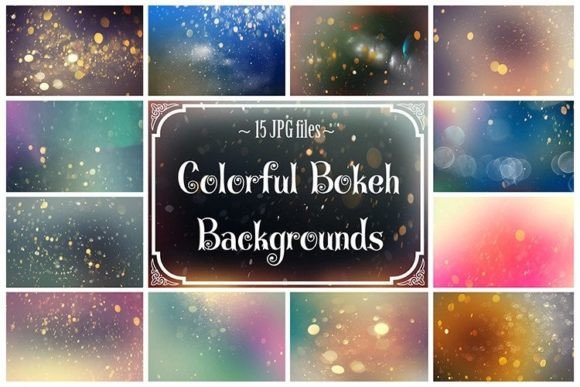
The visual characteristics of these overlays are distinct. They consist of soft, circular shapes of varying opacity and color, mimicking the way a high-end lens renders light points when they are out of focus. The "personality" of these assets is often whimsical, romantic, or energetic, depending on the color palette used. For instance, warm golden bokeh can evoke a feeling of nostalgia or luxury, while cool blue and purple orbs can create a futuristic or calming vibe. This versatility makes them a staple in the toolkit of any creative professional looking to manipulate the mood of their imagery.
Practical Applications: From Photography to Branding
One of the greatest strengths of high-quality Bokeh Backgrounds is their sheer versatility. Because these files are typically high-resolution (such as the 4000x6000 pixels at 300 dpi mentioned in the asset description), they are not limited to just web use. They are robust enough for print media, which opens up a world of possibilities for small business owners and marketers.
Consider the impact on brand identity. A boutique bakery or a wedding planner might use soft pink and white bokeh overlays on their website headers to instantly communicate elegance and romance. Conversely, a tech startup or a DJ might use sharper, neon-colored overlays to convey energy and modernity. When used consistently across social media graphics, flyers, and business cards, these backgrounds help build a recognizable visual language that audiences can connect with.
Beyond branding, the utility extends into scrapbooking and mixed media art. Digital scrapbookers often struggle to find backgrounds that don't overpower their photos. Bokeh textures are perfect here because they are translucent and light. You can layer them over a solid color or a subtle pattern to add visual interest without stealing the show from your main subject. Similarly, in video art and motion graphics, static bokeh images can be animated using keyframes to create floating, atmospheric backgrounds for title cards or lower thirds.
Maximizing Your Workflow with Layer-Based Editing
The technical side of using these assets is straightforward, which is why they are so popular among professionals who value efficiency. Since the product consists of JPEG files compatible with layer-based software—like Adobe Photoshop, GIMP, Paint Shop Pro, or even Procreate on the iPad—the workflow is intuitive.
The process generally involves placing the Bokeh Overlay on a layer above your main image. To blend the effect seamlessly, you simply change the blending mode of the overlay layer. "Screen" or "Lighten" modes are usually the most effective, as they remove the dark areas of the overlay and leave only the glowing light orbs. This non-destructive editing technique allows you to adjust the opacity, transform the size of the orbs, and even mask out areas where you don't want the effect to appear.
However, achieving a realistic look requires a bit of strategic thinking. You cannot simply slap a generic bokeh layer over a photo and expect it to look like it was taken with a DSLR. You must consider the visual hierarchy of your design. The bokeh should enhance the background, not distract from the foreground. If you are designing a flyer or a business card, ensure that the text remains legible over the glowing elements. Often, placing the bokeh behind the subject and using a slight vignette or a semi-transparent shape behind your typography can maintain readability while preserving the artistic effect.
Evaluating Quality and Project Fit
Not all digital assets are created equal. When sourcing Bokeh Backgrounds, quality is paramount. Low-resolution files can look pixelated when printed, breaking the illusion of depth. High-resolution assets, specifically those designed for professional output, ensure that your projects look crisp whether they are viewed on a Retina display or printed on a poster.
When evaluating if these overlays fit your project, consider the lighting of your source image. If your main subject is lit from the left, placing a bokeh overlay that is brightest on the right helps maintain lighting consistency. This attention to detail is what separates amateurish edits from professional-grade design.
Furthermore, the "15 Colorful Bokeh Backgrounds" set offers a variety of hues, which is essential for designers who work with diverse clients. Having a palette that ranges from cool to warm tones means you are prepared for any creative brief. Whether you are creating a Christmas card, a summer festival poster, or a sophisticated corporate background, having the right color variation ensures you don't have to spend time manually color-grading your overlays.
Final Thoughts on Creative Assets
In the fast-paced world of digital content creation, having a library of reliable design assets is not a luxury; it is a necessity. Bokeh Overlays provide a quick and effective way to add depth, color, and emotion to your work. They bridge the gap between a standard snapshot and a piece of art.
By understanding how to manipulate layers, blend modes, and lighting, you can use these backgrounds to enhance your storytelling. Whether you are a photographer looking to rescue a dull image, a scrapbooker adding a touch of magic to a memory, or a marketer designing the next big campaign, the strategic use of bokeh can significantly elevate the perceived value of your final product.